AWS Cognito is one of those services that feels like it can do almost anything if you're willing to wrestle with it long enough. User pools, app clients, hosted UIs, custom auth flows, Lambda triggers... it's an incredibly configurable authentication service, but that flexibility often means you have to build a lot of the features you want on top of it.
While you might be used to working around Cognito's quirks, one significant limitation stands out: AWS Cognito doesn't support SCIM.
If you aren't familiar, SCIM is a protocol designed to make it easier for your customers to manage user identities in your application. Your customers can use SCIM to automatically provision, deprovision, and update user accounts in your app based on changes in their own identity providers (like Okta, Entra, or JumpCloud). Here's a guide on what SCIM is and why it matters.
In this post, we'll look at how you can add SCIM support to Cognito without forcing you to rip out or migrate your existing authentication, using PropelAuth BYO.
Handling SCIM Requests
The SCIM spec defines a handful of endpoints (/Users, /Groups, /Schema, etc.) that you'll need to implement. Each one has its own quirks and edge cases, and different Identity Providers (IdPs) behave differently.
In order to support SCIM, you'll need to implement all these endpoints. To make it easier, with PropelAuth BYO you stand up a single catch-all route (e.g. /api/scim/*) and forward requests to the sidecar. We parse the incoming SCIM requests and reduce them down to a few simple handler functions that you can implement.
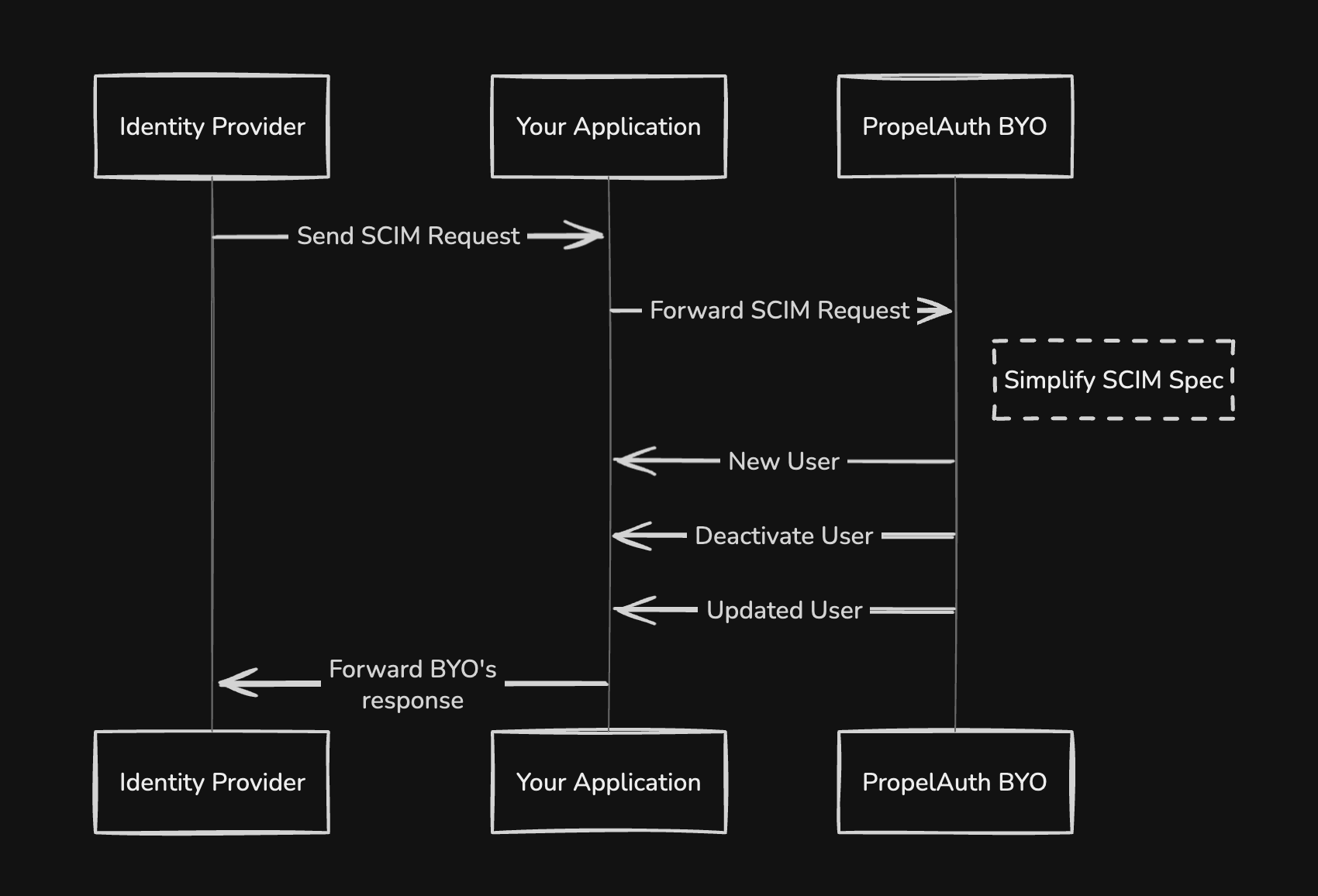
Then, all you need to do is handle the different responses that BYO returns and you'll have a fully functioning SCIM implementation. Let's look at the different types of resopnses BYO will return and how to handle them.
No action required
The most common case is when no action is required from your application. Some examples of when this might happen are:
- SCIM is asking for a list of users they already provisioned to see who else they should provision
- SCIM is querying your app for supported schemas or resource types
- SCIM is fetching a user so they can see if they need to update anything
- SCIM is updating a user, but they didn't actually change anything (not all IdPs are perfect)
In all of these cases, you don't need to take any action, but you do need to provide a valid response back to the IdP. BYO will provide you with an HTTP status code and a formatted response body that you can pass back to the IdP. For TypeScript, as an example, it might look like this:
if (result.ok && result.data.status === "Completed") {
    // Respond to SCIM IdP with the response data
    res.status(result.data.responseHttpCode).json(result.data.responseData);
}
Disable User
When a user is deprovisioned in the IdP, BYO will return a status of ActionRequired and an action of DisableUser. Importantly, this is NOT a delete action and can possibly be
reversed later if the user is re-provisioned.
You should call AdminDisableUser for this user which will prevent them from logging in and will invalidate any existing tokens. Afterwards, you should confirm with BYO that you performed the action, and BYO will provide you with the HTTP status code and response to send back to the IdP.
Enable User
The opposite of disabling a user, when a user is re-provisioned in the IdP, BYO will return a status of ActionRequired and an action of EnableUser.
You should call AdminEnableUser which will allow the user to log in again. Afterwards, you should confirm with BYO that you performed the action, and BYO will provide you with the HTTP status code and response to send back to the IdP.
Delete User
In some cases, an IdP will expect a user to be fully deleted from your system. This can be done because an employee has left the company or after a configurable amount of time passes since the user was disabled.
No matter the reason, when BYO returns a status of ActionRequired and an action of DeleteUser, you should call the AdminDeleteUser function. Afterwards, you should confirm with BYO that you performed the action, and BYO will provide you with the HTTP status code and response to send back to the IdP.
Link User (a.k.a Create/Provision User)
The final case is creating or provisioning a new user. This will depend a bit on your existing Cognito setup.
If you create a new user pool for each customer, you can use AdminCreateUser to create the user in the appropriate user pool (which can be determined using the customerId provided by BYO). You'll then need to call the link function in BYO which will register this user's ID with BYO so future SCIM requests will use your IDs for users.
If you have a shared user pool, you'll still use AdminCreateUser, but you may need to handle the case where the user already exists (for example, if they had an account before they set up SCIM provisioning). In that case, you can either skip creating the user (and instead just link them) or throw an error to allow you to handle it however you see fit.
Managing SCIM Connections
Now that you've implemented the SCIM handlers, the only thing left to do is manage your SCIM connections for each customer. With PropelAuth BYO, you can use the BYO Dashboard to create and manage SCIM connections for each of your customers or you can do it all programmatically.
Whichever you use, your customer just needs to know the SCIM Base URL (the location of your wildcard SCIM endpoint, we used https://example.com/api/scim earlier) and a SCIM API Key (which will be generated in the dashboard or programmatically).
We provide detailed guides for setting up SCIM with popular IdPs and we also provide frontend components that you can drop into your application to allow your customers to self-serve their SCIM configuration.
Built for operators and developers
As with everything in BYO, we designed SCIM support to make life easier for both your engineering team and the folks who will be onboarding and supporting customers. This means it's not just an API, but we also provide:
- Dashboard for onboarding & support. See each connection's users/groups, the exact payloads the IdP sent, and your current mappings - then adjust without redeploying.
- Programmatic everything. The same normalized properties are returned in SCIM request handling (
parsedUserData) and viagetScimUser, so you can enforce policy consistently in code. - Fix it yourself, without the back-and-forth. Update mappings, add fallbacks, and re-check users immediately - no waiting on the customer to reconfigure.
For a deeper dive into how BYO's SCIM support works, check out our blog post on SCIM or our documentation.
If you have any questions or need any help getting started, feel free to reach out to us at support@propelauth.com.